Booting Arch based Distro's in Secure Mode
@shubh_exists|Dec 09, 2024 (2y ago)386 views
Arch and Arch Based Distributions like EndeavourOS and Manjaro do not support signing of their binaries. However, it is an important step if you want your Operating System to boot into Secure Mode.
This is a guide on how to self sign binaries in any Arch based Distribution to make it compatible with Secure Boot ON.
NOTE - If you are trying to dual boot any Arch Based Distro with Windows, Keep your bitlocker keys in a safe place. Disabling Bitlocker would be good. Bitlocker uses signatures present on the device to encrypt the filesystem which would be changes in a later step.
This process worked well for me using
systemdbootmenu. If you are using Grub, you might need to sign extra files that grub generates (I couldn't make it work on Grub :) )
Step 1
Boot into your BIOS and Enable Secure Boot. Set the Secure Boot Mode option to Setup Mode.
This will delete all the current signing keys and set the system up for setting up new keys.
You will be able to boot into Arch now as there are no keys.
Step 2
Install sbctl from AUR -
sudo pacman -S sbctl

Output of running sbctl after installing.
Step 3
Verify if your OS is in Setup Mode by
sbctl status
It should show Secure Boot disabled and in Setup Mode.
Step 4
Generate new keys and enroll them with Microsoft's key to the UEFI
sbctl create-keys
sbctl enroll-keys -m
Step 5
Now we have installed sbctl keys onto our system.
Now we need to manually sign out boot binaries using these keys as Secure Mode won't let us boot into unsigned binaries.
Run -
sudo sbctl verify
This will give us a list of all the files that need to be signed.
You can sign each of them individually by -
sudo sbctl sign -s /boot/EFI/BOOT/BOOTX64.EFI
or just run this to sign them all automatically -
sudo sbctl verify | sudo sed 's/✗ /sbctl sign -s /e'
Step 6
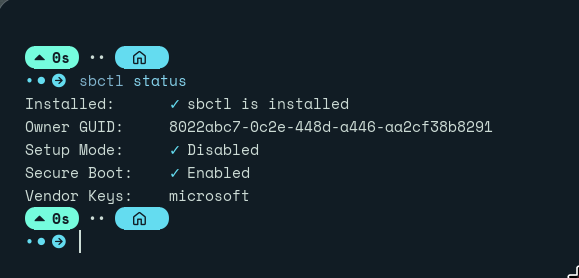
Done! Reboot into the firmware and verify if the secure boot is on. Boot into the OS and you would be able to boot in Arch in Secure Mode!
Running sbctl should now show something like-